Shopify asked app developers to tighten security. What to check now
On October 20 Shopify asked app developers to scan their apps, move to expiring tokens and turn on two-step authentication. What to review on your store this week.
The short answer
On October 20, 2026 Shopify told app developers that attacks through apps are rising, and asked every developer to scan their app, move to expiring access tokens and turn on two-step authentication. The post does not name an app. Shopify has not reported a breach of its own checkout. Merchants should review installed apps and app embeds, confirm the checkout button points to their own domain, and ask app vendors whether they were affected.
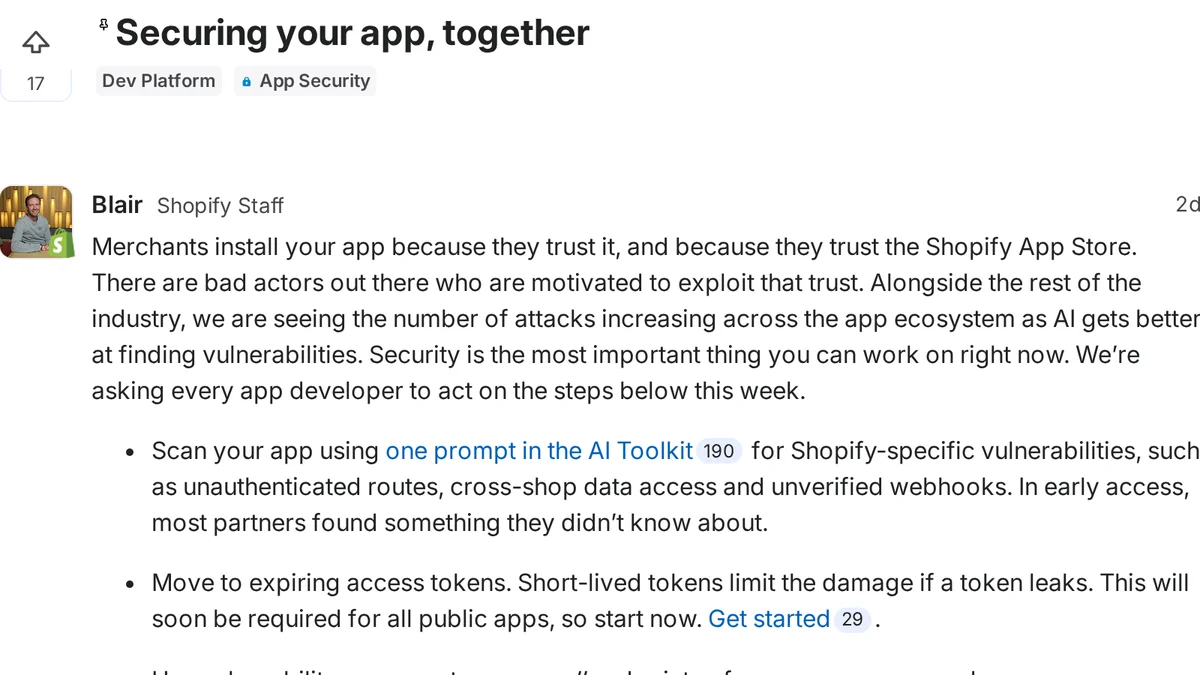
On October 20, Shopify told app developers that attacks across the app ecosystem are increasing. The same week, merchants started hearing about shoppers who clicked checkout, landed on a copy of a checkout page, typed in a card, and were then passed to the real checkout.
The order still went through. That is why a normal conversion rate does not tell you whether your store was affected.
Here is what Shopify has said, what is still reported rather than confirmed, and what we would do as a merchant today.
What has Shopify said?
On October 20, Shopify staff posted Securing your app, together on the developer forum, and @ShopifyDevs pointed partners to it the next day. The post asks every app developer to act: scan their app with Shopify's AI Toolkit, move to expiring access tokens, turn on two-step authentication for every account that touches the app, and treat all rendered data, including data from their own servers, as untrusted.
Shopify also says it is tightening the boundaries for storefront app code, adding IP restrictions for API keys and raising App Store security requirements, with details and timelines to come. The post does not name a store, an app, or an incident.
What are merchants seeing at checkout?
Kurt Elster's write-up describes a pattern from October, drawn from developer statements: a shopper clicked checkout, landed on a convincing copy of a checkout page on an outside domain, entered a card, and was then sent on to the real checkout. The order completed. He summarized the same pattern on X.
No source says Shopify's own checkout was breached. The fake pages lived on outside domains. Because the real order still completed, sales data will not show it.
Kurt also reports that Shopify is rolling out an "Are you sure you want to leave?" screen on storefront links that point to other sites. According to his post, there is no off switch yet, and trusted-domain exclusions are coming in Online Store > Preferences. Shopify has not published merchant documentation for this that we could find, so treat the details as reported, not confirmed.
If your theme links out to another store, a booking tool or a separate blog, click through those links on a live storefront this week so you know what your shoppers will see.
What should merchants do now?
You do not need to uninstall apps in a panic. You do need to know what is running on your storefront.
- Audit your installed apps. Go to Settings > Apps. List every app that loads on the storefront. Remove anything you do not recognize or no longer use. An app you stopped using still has the access you gave it on install.
- Review app embeds. In Online Store > Themes > Customize, open App embeds. Every embed switched on loads on every page. You should recognize each one.
- Check permissions and updates. For each storefront app, look at what access it asked for and whether it has a field for custom JavaScript or HTML. Note those fields; do not edit them while you investigate.
- Watch where checkout goes. In a fresh private window, look at your cart page and confirm the checkout button points to
/cartor/checkouton your own domain. Anything else is a red flag. - Listen to customers. Reports of an extra payment page, a payment error before checkout or card fraud after buying from you are the clearest signal. Pass them to Shopify Support with screenshots.
- Ask your app vendors directly. Email the developers of every storefront app you run and ask whether they were affected, what they changed, and whether they have turned on two-step authentication and moved to expiring tokens as Shopify asked.
What is still unknown?
Shopify's note does not say how many stores or shoppers were affected. It does not name an app. No public statement gives a full root cause or attribution. Some apps have been removed from the App Store in the same period, but a removal on its own is not evidence of a compromise.
We will update this page as Shopify publishes more. For ongoing coverage, follow checkout news on Signal and Shopify news on Signal.
Sources: Shopify developer forum and Shopify Developers on X; Kurt Elster on X and Ethercycle; Kurt Elster on the outbound-link screen.
Frequently asked questions
- Did Shopify name the apps involved?
- No. The October 20, 2026 developer forum post does not name an app, a store, or an incident. It asks every app developer to act on security that week.
- Was Shopify checkout itself hacked?
- No source says so. Reports describe fake checkout pages on outside domains, with shoppers passed on to the real Shopify checkout afterwards.
- How do I know if my store was affected?
- Orders may have completed normally, so conversion rates will not show it. Review installed apps and app embeds, confirm your cart checkout button points to your own domain, and watch for customers reporting an extra payment page or card fraud after buying from you.
- What has Shopify said?
- On October 20, 2026, Shopify asked every app developer on its developer forum to act on security steps that week, including scanning apps, moving to expiring access tokens and enabling two-step authentication. The post does not name any app or incident.
- What is the new "Are you sure you want to leave?" screen?
- Kurt Elster reports that Shopify is rolling out a warning screen on storefront links to other sites, with no off switch yet and trusted-domain exclusions coming soon. We could not find Shopify documentation for it yet.